
How to Create Town Planning Cheat Sheets
Cheat sheets have been doing the rounds in the “how to be a property developer” world for years. Back in the day, people were always asking me for one because they wanted a quick way to analyse a site without drowning in planning codes.
At the core, a town planning cheat sheet pulls together the essentials: car parking rates, setbacks, building height limits, site cover rules, minimum lot sizes, and anything else that sets the framework for development. Done right, they save you hours and let you screen sites fast. But they only work if they’re accurate and specific.
Here’s my process for building one.
Step 1: Define Your Area of Focus
Every council (and often different zones within the same council) has its own rules. Start by locking in the location you want to focus on. This makes the cheat sheet practical instead of generic. For example, a cheat sheet for New Farm in Brisbane is going to look very different to a sheet for Everton Park in Brisbane. Same Council but different neighbourhood plan areas.
Step 2: Define Your Development Type
The setbacks, site cover etc will change depending on whether you are proposing a house or a dual occupancy or townhouses so it is best to determine if you want your cheat sheet to be for a specific use e.g. your subdivision checklist will be seperate to your townhouse checklist.
Step 3: Collect the Key Planning Information
Pull together the relevant codes from the planning scheme for your chosen area and development type. Don’t just copy and paste everything focus on what actually matters when screening a site.
Include things like:
Minimum lot sizes and subdivision rules for your zone/s.
Access requirements: like minimum driveway widths or frontage.
Car parking rates: how many spaces per dwelling, per floor area, or per use.
Setbacks: front, side, and rear distances from the boundary.
Building height limits: both the number of storeys and metres.
Site cover and GFA (Gross Floor Area) limits.
Level of Assessment tables: what’s code assessable, impact assessable, or prohibited.
These are the things that let you quickly say: “Yes, this site ticks the boxes” or “No, don’t waste your time.”
Step 4: Organise It in a Usable Format
It’s no good if the cheat sheet is just a jumble of copied text. You want it simple and structured.
Tools I use:
ClickUp: my go-to for documenting and organising everything (I use this for UPQ and DevelopSure).
Notion: has a great free version, easy for tables and checklists (I use it for Property4Good and even travel planning).
I’ve given an example below how I organise my cheat sheets however I acknowledge everyone processes information differently so make sure the information is presented in a way that works for you and your brain. You just want to be able to access the key information quickly so you can make a decision to move forward or leave a site.
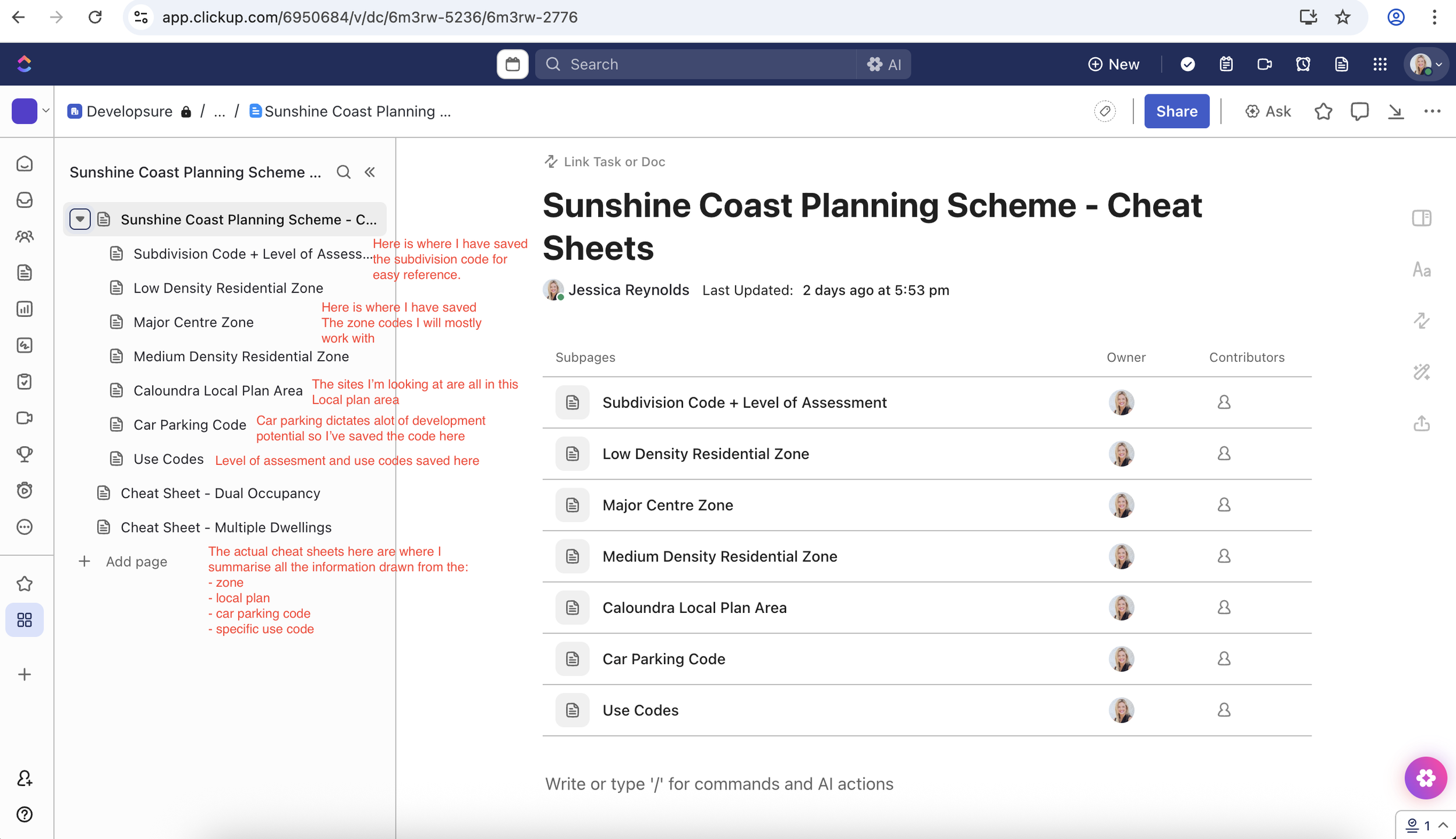
Example of how I layout my town planning cheat sheet information in ClickUp.
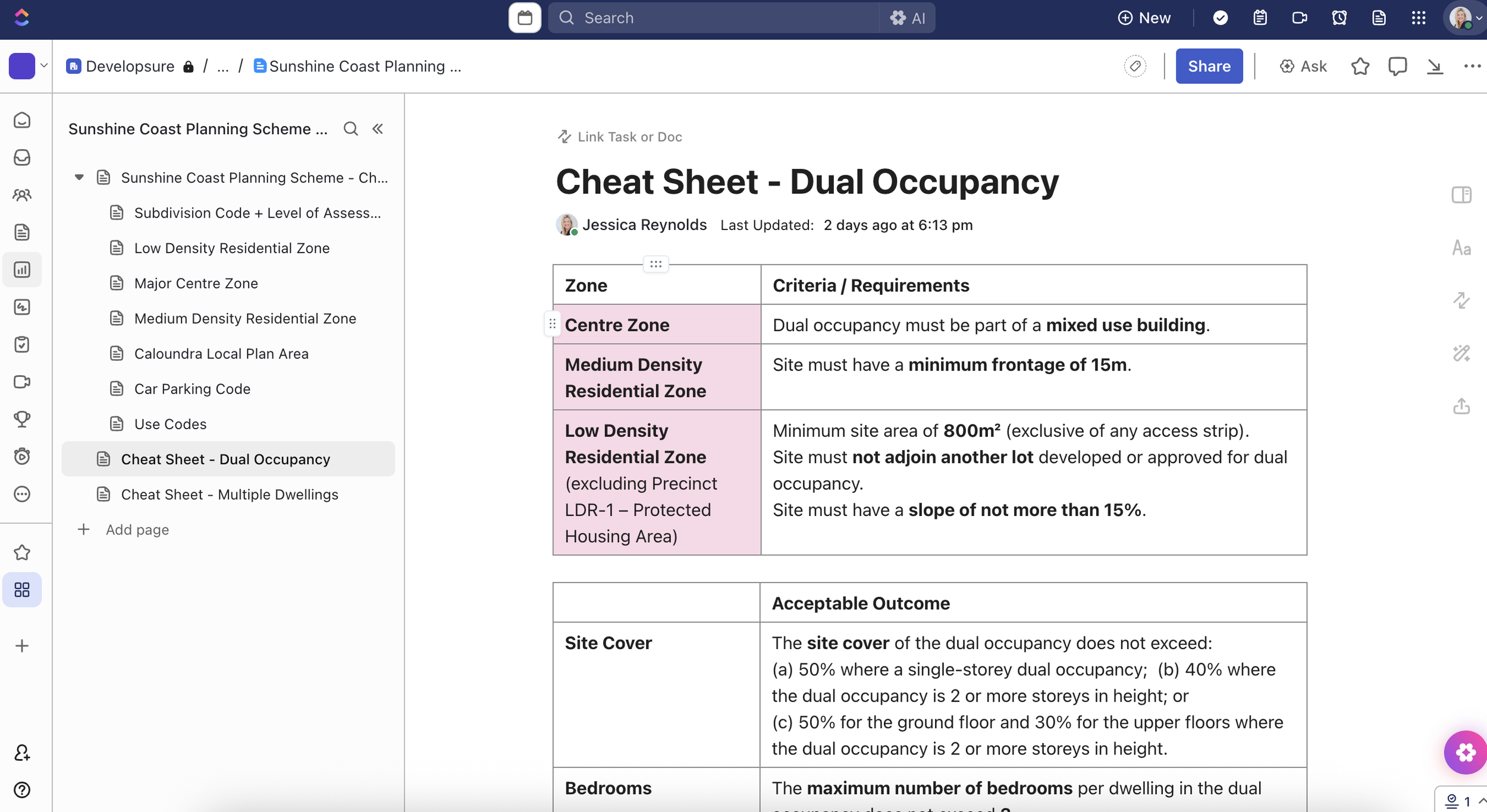
Cheat sheet example for Dual Occupancy requirements in key zones.
Step 5: Use It for Speed. Not Shortcuts
The point of the cheat sheet is speed. You want to get to a go/no-go decision faster. But here’s the warning: just because a site can be developed doesn’t mean it should. Context, market demand, and design constraints still matter.
That’s why I always come back to the principle of being DevelopSURE, running the numbers, looking at the reality, and not getting carried away by what looks possible on paper.